Green before 10am. Red by close.
Your pattern is in the data. Let's fix it.
MarketCorrector is the AI-automated trading journal built for prop firm futures traders.
Master your setups, track discipline in real time, and finally pass — and keep — your eval.
One button generates your debrief, pattern breakdown, and trade review in a single coaching report — built from your real trade data, not generic advice.
Chart Scan
Auto-Mark Missed Trades
Upload a chart screenshot and the AI marks every setup as Good, Missed, or Avoid — matched against your own winning trade history, not a generic playbook.
Stop journaling like an amateur.
Create your free account in 30 seconds. First trade logged in under a minute. First eval saved — that's on you.
The gap between knowing your edge and executing it is entirely behavioral.
You can have a profitable setup and still blow the eval. The problem is never the strategy — it's what happens between the setup and the save button. MarketCorrector exists for that gap.
01
The discipline engine
Because willpower alone doesn't survive a drawdown streak.
Every profitable trader eventually figures out that consistency beats conviction. But "be more disciplined" isn't a system — it's a wish. MarketCorrector turns your rules into a live score you can see degrading in real time. When the number starts dropping mid-session, you know before it costs you an eval.
78%
Avg discipline score among traders who keep their accounts past 30 days
1 rule breach
Is all it takes. The eval that blew up almost always has a single tilted trade at the center of it.
20 sec
To log a trade with all context — fast enough to do it while still at the desk.
02
Prop firm accountability
Because the daily loss rule doesn't care how good your setup was.
Prop firm evals have hard rules with zero tolerance. Most traders who fail an eval don't fail because they had a bad strategy — they fail because they kept trading when the daily loss gauge was already in the red. MarketCorrector shows you where the gauge is, in real time, linked to every trade you log. You'll see the amber zone before you enter it.
📊
Daily loss gaugeColor-coded: green → amber → red. Turns amber before you're within $200 of the limit.
🎯
Profit target progressSee exactly how far you are from passing, updated after each logged trade.
🏦
Multi-account trackingRunning two evals at once? Both accounts tracked separately, no confusion.
⚡
Auto-loaded firm rulesPick Apex, Topstep, MFFU — the drawdown and loss limits auto-populate. No manual setup.
03
Behavioral pattern recognition
Because you're probably repeating the same mistake on the same day at the same time.
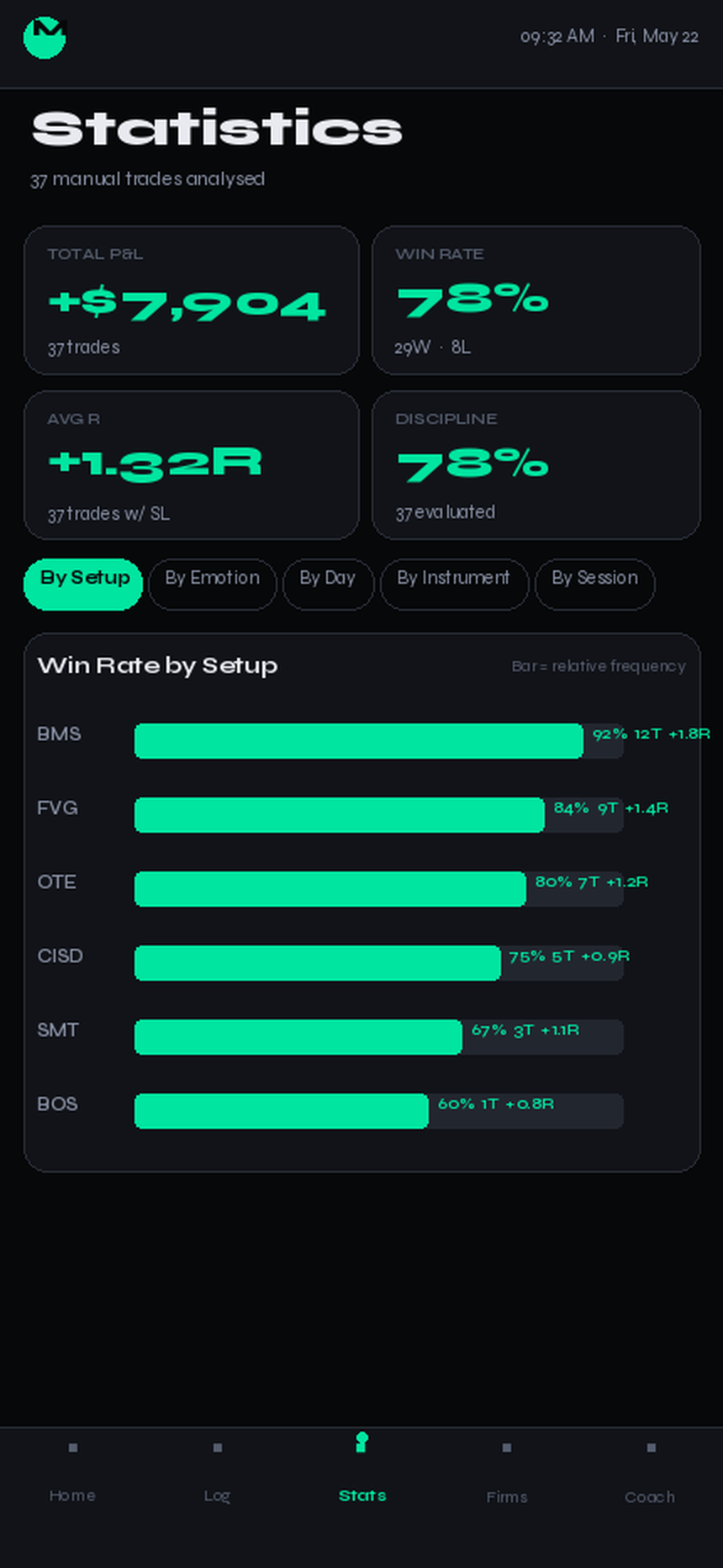
Most traders have a predictable leak. Maybe it's Monday morning FOMO. Maybe it's chasing fills after a missed entry between 9:30 and 9:45 AM. Maybe your FVG trades are printing but your OB trades keep stopping out. You won't spot any of this from memory — but the stats screen shows it in a bar chart after 10 trades.
By Setup
Which ICT concepts actually have edge in your hands. BMS might be 85% for you and 40% for someone else.
By Emotion
What's your win rate when you're "focused" vs "FOMO"? For most traders, the gap is bigger than they think.
By Time of Day
Do you perform better in the London open or the NY open? The data doesn't lie even when the recency bias does.
By Day of Week
A lot of traders quietly bleed on Mondays and don't know it. The stats tab will tell you in under a second.
04
Built for ICT traders
Because you shouldn't have to explain what an FVG is to your own journal.
Generic journals use generic categories. MarketCorrector was designed around the ICT methodology from the start — the setup tags, the terminology, the trade types. IFVG, SMT, FVG, OB, CISD, LSW, EQ, BOS are first-class fields. You log what you saw, not a workaround approximation of it.
IFVGSMTFVGOBCISDBMSOTELSWEQBOSMSS+ custom
Add your own symbols and setups once — they're saved permanently and show up in every future trade log.
Features
Everything a futures journal should do. Nothing it shouldn't.
Every screen built for futures traders running prop firm accounts. No stock screeners, no crypto noise — trade logging, live gauges, AI coaching, chart scanning, and a PnL calendar that actually tells you something.
Core
📝
4-Step Trade Logging
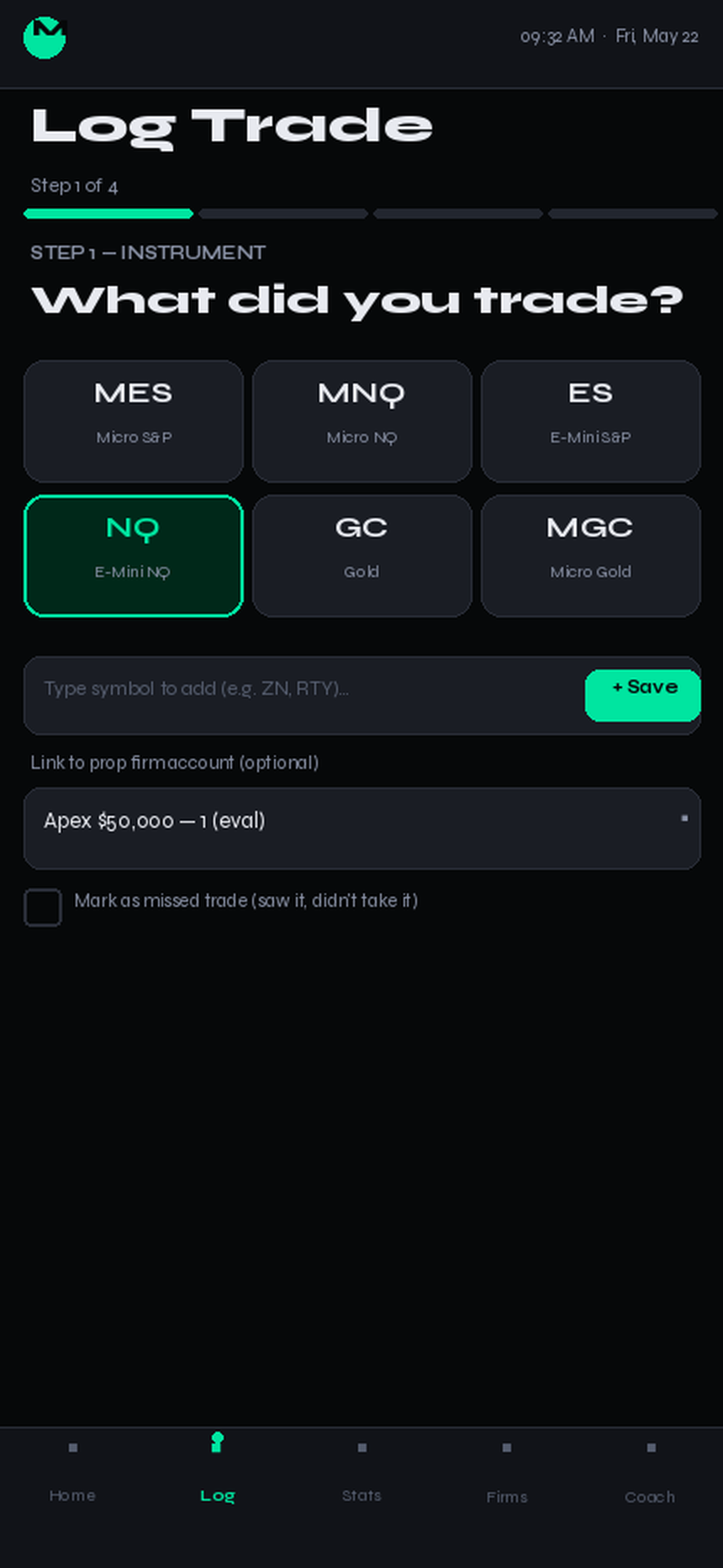
Instrument → setup → emotion → rule check. The whole flow takes 20 seconds. Mark missed trades, voice-memo your reasoning, or import a full session from a Tradovate or NinjaTrader CSV.
MES, MNQ, ES, NQ, GC, MGC + custom symbols
Preset + custom setup tags — log exactly what you trade
"Mark as missed trade" — log setups you skipped
Quick Import: Tradovate CSV · NinjaTrader CSV
History
📅
PnL Calendar
Trade History is now a live calendar. Every trading day shows green, red, or blank based on that day's P&L. Tap any day to see every trade logged — time, setup, emotion, and notes.
Monthly view with per-day P&L coloring
Monthly total, win days, loss days at a glance
Tap a day → popup with full trade list
Discipline
🎯
Real-Time Discipline Score
Every trade either reinforces or breaks your rules. The score updates live — you see the slip before the violation. Customizable rules tied directly to prop firm requirements.
Add, pause, or remove rules anytime
Rule-breach badges on every trade card
Discipline trend visible in Stats
Prop Firms
🏦
Live Prop Firm Gauges + Bank Connect
Daily loss, drawdown, and profit target tracked live for all major prop firms. Connect your bank via Plaid to auto-detect payouts and purchases — no manual entry.
Plaid bank connect — auto-detect prop firm transactions
Multi-account: eval and funded side by side
Stats · Pro
📊
Statistics + R-Multiple Tracking
Win rate alone is a lie. Stats breaks performance down by setup, day, instrument, and session — plus R-multiple tracking shows whether your winners are actually worth your losers.
Cumulative P&L equity curve
R-multiple per trade — avg R, best/worst, distribution
Win Rate vs Avg R correlation chart by setup
AI Coach · Pro
🤖
Full Coaching Report
One button. One report. Debrief + pattern analysis + trade review generated together from your actual journal data. Today or Last 7 Days. No tabs, no separate runs.
Session summary, what worked, what to fix
Pattern insights from your trade history
Tomorrow's focus — specific, not generic
AI Coach · Pro
📸
Chart Scan
Upload a chart screenshot. The AI reads your winning trade history and marks every visible setup as Good, Missed, or Avoid — matched to your actual edge, not a generic playbook. Unlocks after 7 trading days.
Reads your last 60 days of real trade data
Classifies setups: ✅ Good · 🔴 Missed · ⚠️ Avoid
Log missed setups directly from scan results
Planning
◐
Daily Bias Builder
Set your directional bias, key levels, and confluences before the session opens. Your bias is referenced throughout the day — the AI Coach flags trades that went counter to your plan.
Bullish / Bearish / Neutral with key price levels
Confluence notes saved per session
Counter-bias trades automatically flagged
News
🗓️
Live Economic Calendar
The dashboard pulls the live ForexFactory calendar — FOMC, NFP, CPI, PPI flagged on your home screen every morning. No surprise news events mid-session.
Red/amber impact events only — no noise
Times in ET, updated live
Sourced from forexfactory.com
Insights · Pro
⚡
Breach Insights
Tracks every eval and funded account breach and surfaces the behavioral root causes — overtrading, revenge, drawdown patterns — ranked by frequency and financial damage.
Breach event log with cause tagging
Pattern ranking by damage score
Guides you to the exact rule to fix first
See it in action
Real screenshots, real screens.
Captured straight from the live app — the PnL calendar, prop firm gauges, AI coaching report, chart scan, and daily bias builder.
Trade Log
A trade log that actually gets logged.
Most journals fail because logging takes 5 minutes and you stop doing it. MarketCorrector's 4-step flow is optimized for the moment right after you flatten — when you're still tilted and most likely to skip.
✓
20-second logging. Tap, tap, tap, done. Fields you don't need are optional.
✓
ICT-native. IFVG, SMT, FVG, OB, CISD, LSW, EQ, BOS are first-class. Add your own symbol once and it sticks.
✓
Mark as missed trade. Log the setups you saw but didn't take — the misses teach as much as the fills.
Trade Log · Step 1
Prop Firm Mode
Watch the gauges, not the chart.
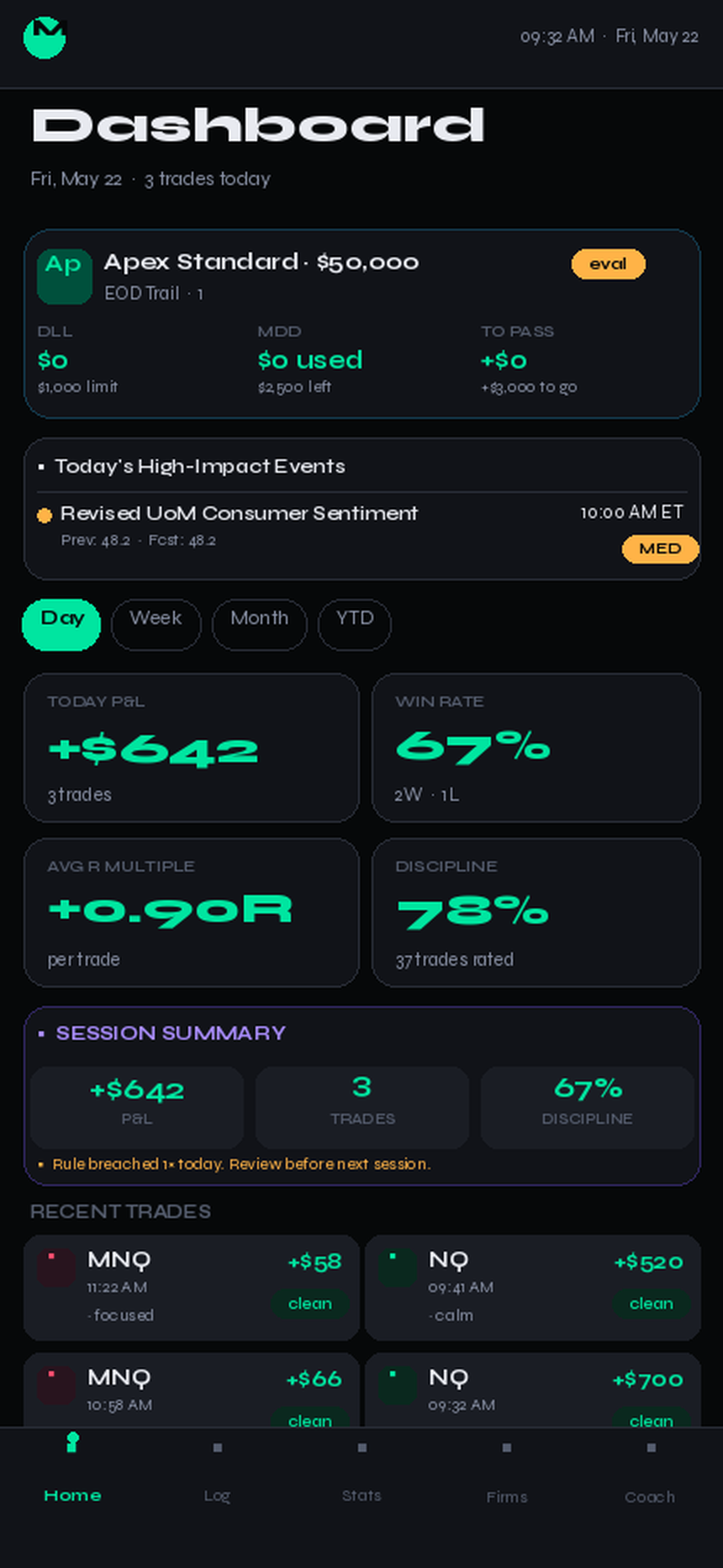
Every prop firm has different rules. MarketCorrector tracks all of them in the background, in real time, color-coded. The gauge turns amber before you're in trouble and red before the violation triggers.
✓
9+ firms supported: Apex, TopStep, MFFU, Tradeify, Alpha, Lucid, Earn2Trade, Bulenox, The Funded Trader, TPT, and FTMO.
✓
Auto-loaded rule sets. Pick your firm and account size — the rules wire themselves up.
✓
Multi-account. Run a $50K Apex eval and a $25K MFFU funded at once without losing track.
Prop Firms
Discipline Engine
The number that actually matters.
P&L is a result. Discipline is the input. MarketCorrector's discipline score is calculated from the rules you set — and you can see exactly when it starts to slip.
✓
Custom rules. Max trades per day. No trading after 2 losses. No trading around FOMC. You decide.
✓
Live discipline gauge. Updates per trade. Color-coded.
✓
Pause, don't delete. Pause a rule for the day if it doesn't fit a strategy day.
Dashboard
AI Coach · Powered by Claude
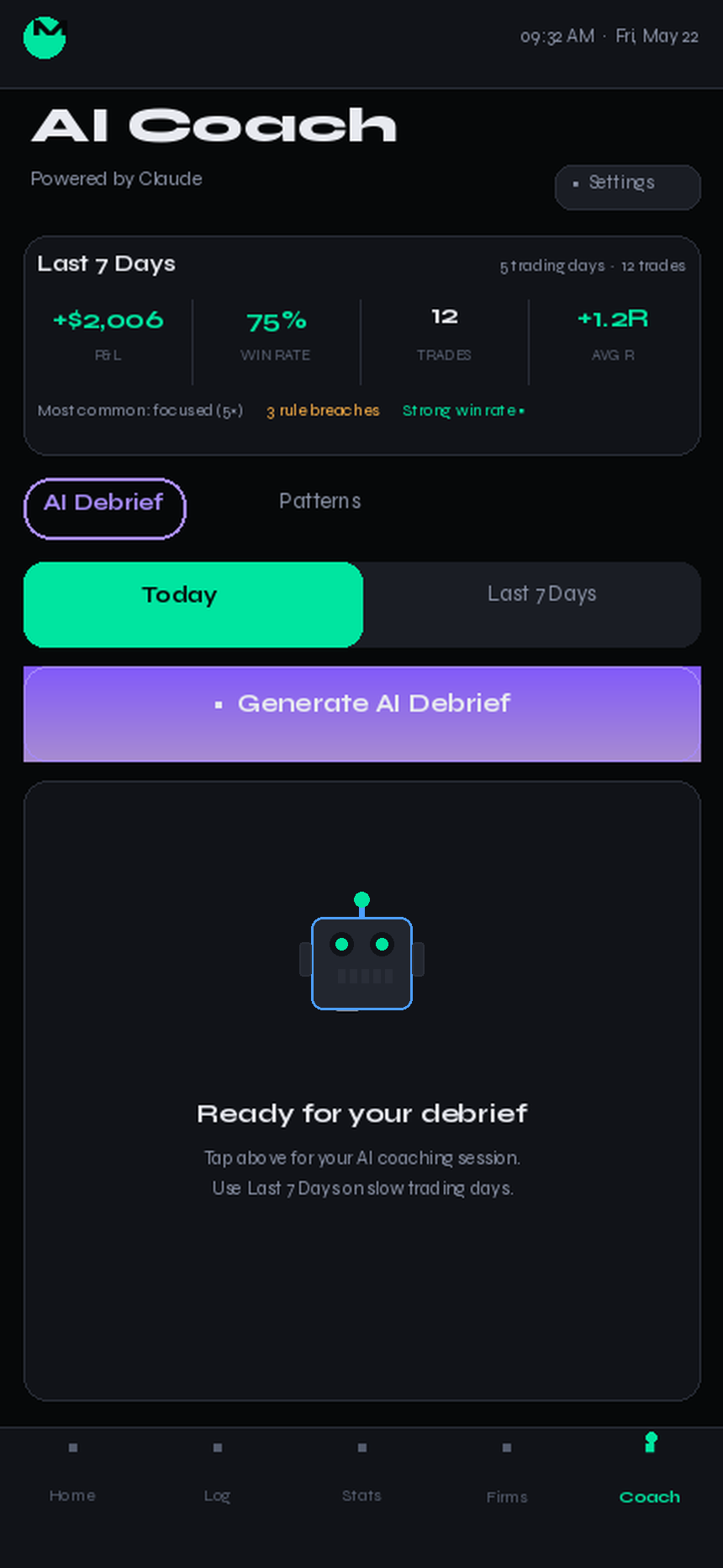
An AI coach that reads your journal.
The AI Coach reviews your logged trades and generates a behavioral debrief — what you did well, where discipline slipped, and the patterns you can't see yourself.
✓
AI Debrief. A written coaching session on your recent trades, generated on demand.
✓
Patterns tab. Surfaces recurring behavioral tendencies across your history.
✓
Today or Last 7 Days. Daily debriefs on trading days, weekly recaps on slow ones.
AI Coach · Powered by Claude
Sample Output
This is what your AI Coach looks like.
Generated from real trade data — not a template. Every report is unique to your history.
🧠
AI Coach Report
Thursday, May 22 · 14 trades analyzed
Powered by Claude
78
Discipline
+$342
Net P&L
57%
Win Rate
"Today was a discipline split. Your VWAP reclaim setups were clean — 4 for 5, average +$112 each. But you took 3 OTE entries after 11:30am EST, averaging –$87 each. That afternoon session alone cost you $261 and broke your no-FOMC-window rule twice. The math is clear: your morning edge is real. Your afternoon is a habit problem."
Behavioral Patterns Detected
⚠️
Revenge trading after stop-outs
3 of your 5 losing trades came within 8 min of a prior loss. Average loss: –$94.
✅
Strong pre-market bias execution
5 of 6 trades aligned with your daily bias note. Those averaged +$68 vs –$31 when misaligned.
🎯
Tomorrow's Focus
Set a hard cutoff at 11:15am EST. No new entries after. Your data shows you have a real edge before noon — protect it by removing the afternoon decisions entirely.
↑ Generated in seconds from your actual trade log. Yours will be different — built from your data.
testimonials
From the community.
From traders using MarketCorrector to pass evals and stay funded.
★★★★★
"Passed my FTMO $100k challenge in 3 weeks after switching. The discipline score was brutal to look at — didn't realize how often I was revenge trading. Once I saw it in the data, it stopped."
JR
Jake R.
ES futures · FTMO
★★★★★
"Setup stats showed me I was 68% win rate before noon and 31% after. I cut afternoon trading completely. Best rule change I've ever made — and MarketCorrector's data made it obvious."
TM
Tyler M.
NQ futures · My Funded Futures
★★★★★
"Running 4 prop accounts across TopStep and Apex. MarketCorrector tracks all of them without a spreadsheet. The live drawdown gauges alone save me from blowing up during news spikes."
CS
Chris S.
CL futures · TopStep + Apex
vs. the alternatives
Every competitor records your trades. MarketCorrector analyzes them.
Other journals show you what happened. MarketCorrector shows you why it keeps happening — and gives you a coach that tells you what to fix.
Feature
MarketCorrector
TraderSync
TradeZella
Edgewonk
R-multiple tracking per trade
✓ Auto-calculated
Manual
Manual
Manual
AI behavioral coaching
✓ Live
—
Partial
—
Rule discipline scoring
✓ Real-time
—
Partial
—
"Mark as missed trade"
✓ Built-in
—
—
—
Economic news calendar
✓ Auto (FOMC, CPI, NFP)
—
—
—
Mobile-first PWA
✓ iOS & Android
Mobile web
Mobile web
Desktop only
Broker import (CSV + auto-sync)
✓ 4 platforms
✓ Many
✓ Many
CSV only
Prop firm account tracking
✓ 11 firms, live gauges
—
—
—
Pricing
Pricing designed to scale with you.
Start free and upgrade when you're ready. No contracts, cancel anytime.
✦ 2 months free with yearly
Free
$0 / forever
Full trade log and discipline engine, no card needed.
Everything you need to set up, understand, and get the most from MarketCorrector.
Overview
MarketCorrector is an AI-powered trading journal built for prop firm futures traders. Log every trade in 20 seconds, track discipline in real time, and get behavioral coaching from Claude — all from one app.
What it does
MarketCorrector sits between your trading platform and your decision-making. After every trade you log what happened — instrument, setup, emotion, rules followed — and the app tracks patterns you can't see yourself.
The three core pillars are: Discipline (live rule scoring every trade), Stats (setup-level win rate and R-multiple breakdowns), and Coaching (AI reports generated from your actual journal data).
Who it's for
Futures traders on Apex, Topstep, MFFU, Tradeify, and other prop firm evals — or on a personal live account. The app is optimised for traders who are already profitable in strategy but losing evals to discipline failures.
Free plan includes unlimited trade logging, discipline scoring, one prop firm account, and the dashboard. Base adds Statistics and unlimited prop accounts. Pro adds AI Coach and Chart Scan.
Supported platforms
MarketCorrector is a PWA — install it on iOS or Android from your browser (Add to Home Screen). It also works on desktop. No app store required.
Get your first trade logged and your prop firm account set up in under five minutes.
Create your account
Go to marketcorrector.com and click Create Free Account.
Sign in with Google or create an email account. No credit card required.
You'll land on the Dashboard. On iOS/Android, tap Share → Add to Home Screen to install as an app.
Add a prop firm account
Tap Firms in the nav and hit + Add Account.
Select your firm (Apex, Topstep, MFFU, etc.) and account size.
Choose Eval or Funded phase. Rules auto-populate.
Tap Add Account. Daily loss, drawdown, and profit target gauges are now live.
Log your first trade
Tap Log Trade (the + in the nav).
Pick your instrument, direction, and setup tags.
Rate your emotion and check off your rules.
Enter your entry, exit, and stop price, then tap Submit.
The whole flow takes about 20 seconds. You can also import a full session from a Tradovate or NinjaTrader CSV — go to the Import tab inside Log Trade.
Trade Logging
The 4-step trade log is the foundation of everything. Fast enough to complete at your desk before you close the platform.
The 4-step flow
Step 1 — Instrument and direction. Step 2 — Setup tags and emotion. Step 3 — Planned entry, stop, and target (optional but recommended for R-multiple tracking). Step 4 — Actual prices, rules check, notes, and media.
Tip: Entry + stop price in Step 3 is what calculates your R-multiple. If you skip it, R shows as — in Statistics.
Setup tag glossary
ICT (Inner Circle Trader) is a methodology focused on institutional order flow, liquidity, and market structure. These are the preset tags available in MarketCorrector:
FVG — Fair Value Gap. 3-candle imbalance where price is likely to retrace.
IFVG — Inverse FVG. A filled FVG that then acts as support or resistance.
OB — Order Block. The last opposing candle before a major impulse move.
SMT — Smart Money Tool. Divergence between correlated pairs (e.g. ES vs NQ) showing institutional intent.
BOS — Break of Structure. A break above/below a prior swing high or low confirming trend direction.
CISD — Change in State of Delivery. First candle to close in the opposite direction after a liquidity sweep.
LSW — Liquidity Sweep. A wick through equal highs or lows to grab stops before the real move.
EQ — Equilibrium. The 50% midpoint of a range — the boundary between discount and premium pricing.
OTE — Optimal Trade Entry. The 62–79% Fibonacci retracement zone for entering after a BOS.
VWAP — Volume Weighted Average Price. Institutional benchmark; reclaims and rejections are key levels.
Not using ICT? No problem — you can create custom setup tags and ignore the ones that don't fit your strategy.
Setup tags
Preset tags include common setups. You can add custom tags once — they persist across every future trade log. Tags feed directly into the Statistics breakdown by setup.
IFVGSMTFVGOBCISDBMSOTELSW+ custom
Mark as missed trade
Saw a setup but didn't take it? Check Mark as missed trade at the top of Step 1. Missed trades are logged separately and feed into the Chart Scan auto-detection system.
Import from CSV
Import a full session without logging each trade manually.
In Log Trade, tap the Import tab.
Export a CSV from Tradovate (Trade History) or NinjaTrader (Trade Performance).
Drop or paste the file. The app auto-detects columns and previews the trades.
Confirm to import. Trades are added with source: import.
Statistics
Win rate alone is a lie. Statistics breaks your performance down by setup, day, session, instrument, and R-multiple so you can see exactly where your edge lives.
Equity curve
The top of the Stats screen shows your cumulative P&L as a line chart. Each point is a trading day. Green days stack up, red days pull down. The curve shows your real trajectory, not just the final number.
Setup Performance table
Every setup tag you've used shows Win%, Avg R, total P&L, and trade count. Sort by any column. This is where you find out which setups actually have edge in your hands — not in a backtest.
R-Multiple tracking
R-multiple measures each trade's outcome relative to its planned risk. A +2R trade made twice your stop distance. A -1R trade lost exactly your stop.
What's shown
Avg R across all trades, best and worst single trade R, distribution histogram by bucket (e.g. how many trades were between +1R and +2R), and the Win Rate vs Avg R correlation scatter chart.
Requires: entry price and stop price logged in Step 3 of the trade log.
Timing breakdowns
See your win rate and P&L split by Day of Week, Session (Pre-Market, RTH, After Hours), and Hour of Day. Most traders have a predictable leak — a day or time window where they consistently lose. Timing shows it in one view.
Advanced stats
Best win streak, worst loss streak, maximum peak-to-trough drawdown, and average stop-loss distance in points.
AI Coach
Written coaching reports generated from your actual trade data by Claude (Anthropic). One tap for a full debrief — no chatbot, no generic advice.
Generating a report
Go to Coach in the nav.
Choose Today or Last 7 Days mode.
Tap Generate Full Report. Takes 20–35 seconds.
The report covers: Session Summary, What Worked, What to Fix, Pattern Insights, Tomorrow's Focus.
The report reads your trade notes, voice memos, chart screenshots, and discipline scores — not just the numbers. The more context you log per trade, the better the coaching output.
Saving reports
After a report generates, a Save This Report button appears at the bottom. Saved reports are stored with a date and time stamp and accessible in the Saved Reports section below the generate button.
Generate a report.
Tap 💾 Save This Report.
The report is saved to your history. Tap any saved entry to expand and re-read it.
Up to 30 reports are stored. Oldest entries are removed automatically when the limit is reached.
Chart Scan
Available inside the Coach screen. Upload a chart screenshot and the AI classifies every visible setup as Good, Missed, or Avoid — matched against your own winning trade history. See
Prop Firms
Track daily loss, drawdown, and profit target live for every major prop firm. Rules auto-load when you pick your firm and account size.
Choose account type (Standard, No Activation, etc.) and account size.
Select Eval or Funded phase. Daily loss, drawdown, and profit target rules auto-populate.
Add an optional nickname (e.g. "2nd attempt"), then tap Add Account.
Logging trades against an account
In Step 1 of the trade log, select an account from the prop account selector. Trades logged against an account update that account's P&L and daily totals in real time.
The daily loss gauge turns amber when you're within $200 of the limit, and red before a breach triggers. The app also shows a breach alert if you cross the line.
Profit target popup
When your cumulative P&L on an eval account hits the profit target, a congratulations popup appears asking whether you're requesting a funded account. Confirming updates the account status to Funded so it tracks funded rules going forward.
Payout tracking
Connect your bank via Plaid to auto-detect prop firm payouts and account purchases. Once connected, transactions from your prop firm appear as payout records on the account card. You can also log payouts manually.
Daily Bias
Set your trading bias before the session starts. Structure, direction, key levels, and news flags — all in one pre-market template.
Filling in your bias
Go to Bias in the nav. Today's date is pre-filled.
Set market structure: Trending, Ranging, or Uncertain.
Set your directional bias: Bullish, Bearish, or Neutral.
Enter key levels — support, resistance, and any POIs you're watching.
Note your planned setups and session focus.
Tap Save Bias.
High-impact events (FOMC, NFP, CPI) are automatically flagged on today's bias card from the live ForexFactory calendar. No manual entry needed.
How bias feeds coaching
When you generate an AI Coach report, the daily bias is included in the context. The AI compares your planned direction against your actual trades and flags misalignments — e.g. you wrote Bearish bias but took two Long entries.
Chart Scan
Upload a chart screenshot. The AI reads your trade history and marks every visible setup as Good, Missed, or Avoid — calibrated to your actual edge, not a textbook.
Running a scan
Go to Coach and scroll to the Chart Scan section.
Tap Upload session chart screenshot and select a 5m or 15m chart.
Tap Scan Chart. The AI reads your last 60 days of trade data.
Results appear as a list of setups with a classification: ✅ Good, 🔴 Missed, ⚠️ Avoid.
Tap any missed setup to log it directly as a missed trade.
Unlock requirement: Chart Scan requires 7 trading days of logged data so the AI has enough history to calibrate against your actual win rates by setup.
What the classifications mean
Good
This setup has strong historical performance in your hands. The AI saw it in your winning trades at a high rate.
Missed
A setup you historically take and win with, but didn't enter here. Worth reviewing why you passed on it.
Avoid
This setup has a poor historical win rate for you, or you have a documented pattern of losing on it. The AI flags it as a risk.
FAQ
Questions traders actually ask.
Is MarketCorrector really free?
Yes — the core journaling is free forever, no card required. You get unlimited trade logging, setup tags, real-time discipline scoring, the session summary on your dashboard, and one prop firm account with live gauges. Base ($10/mo) adds Statistics and unlimited prop accounts. Pro ($19/mo) adds AI Coach and Chart Scan. Both have a 7-day free trial.
Does it work on iPhone? Android?
Both. MarketCorrector is a PWA — after sign-up you'll land in the app. Tap "Add to Home Screen" (iOS) or "Install app" (Android) to pin it. It behaves like a native app: full screen, home-screen icon. No app store required.
Can I import trades instead of logging manually?
Yes. Go to Log Trade → Import tab. Export a CSV from Tradovate (Trade History) or NinjaTrader (Trade Performance) and drop it in. The app auto-detects columns and imports your trades in seconds.
How does the discipline score work?
You define your rules (e.g. "Max 3 trades per day", "No trading after 2 losses"). Each trade you log, you check whether you followed each rule. The score is the percentage of rules followed across all evaluated trades. It updates live after every submission.
What prop firms are supported?
Apex, Topstep, MFFU, Tradeify, Alpha Futures, Lucid, Earn2Trade, Bulenox, The Funded Trader, TPT, FTMO, and FundedNext. Each firm has multiple account types and sizes with auto-loaded rules. You can also track a Personal Live Account.
What AI model powers the coaching?
Claude by Anthropic — the same model that powers Claude.ai. Reports are generated on-demand from your journal data. Nothing is pre-written or templated.
Is my trading data private?
Yes. Your data is stored in your own Supabase account row, encrypted at rest, and never used to train AI models. Your trade data is only sent to the AI at the moment you tap Generate Report — and only to produce your report.
Can I cancel at any time?
Yes. Cancel from your billing settings at any time. You keep access until the end of your current billing period. Your data stays intact on the Free plan after cancellation.

Get started
Pick your plan
Free forever, or unlock the full stack with Pro.
Free
$0 / forever
Full trade log, discipline engine, and prop firm gauges — free, forever.
✓ Unlimited trade logging
✓ Full ICT setup library
✓ Real-time discipline scoring
✓ 1 prop firm account with live gauges
✓ Tradovate CSV import
🔒 Statistics, AI Coach, Account Overview
Most popular
Base
$10 / mo
Statistics, unlimited prop accounts, and everything to pass your eval.
✓ Everything in Free
✓ Statistics — Setup, Day, Session, R-multiple
✓ Unlimited prop firm accounts
✓ Daily Bias builder
✓ CSV / Excel exports
🔒 AI Coach, Chart Scan
Pro
$19 / mo
AI Coach, Chart Scan, and broker sync — the full analytics stack.
✓ Everything in Base
✓ AI Coach — Full Report + Chart Scan
✓ Account Overview + multi-firm tracking
✓ Tradovate live broker sync
✓ Weekly AI recap reports
✓ Discord Pro role + priority support
No card required on Free. Base and Pro trials are 7 days, cancel with one click.
Sign in to continue
Create your account or log in — your journal syncs automatically.
or
By continuing you agree to our Terms and Privacy Policy. Your data is always yours.
Disclaimer
Not financial advice
MarketCorrector is a trade journaling and discipline tracking tool. Nothing on this platform constitutes financial advice, investment advice, or a recommendation to buy or sell any financial instrument. Past trade performance displayed is for informational purposes only and is not indicative of future results. Always trade responsibly and within your own risk tolerance.